
Profit WhalesMaking advertising data easier to work with.
UX/UI design for a SaaS application used by brands selling on Amazon. Dashboards, product tables and campaign controls bring advertising and sales information into one workspace.
- SaaS · Amazon advertising
- Product & UX/UI design
The project at a glance
- My role
- Product & UX/UI designer.
- The product
- A SaaS application for brands selling on Amazon.
- Interface scope
- Advertising dashboards, product tables and campaign schedules and controls.
- Design deliverables
- Desktop and mobile layouts, chart styles and reusable interface components.
The task
The application combines detailed product data with an overview of advertising performance. The interface needs to support both a quick review of key metrics and closer work with individual products, campaign settings and schedules.
From overview to detail
Review performance
Metric cards and charts provide a starting point. Date ranges and comparison views help keep the context visible while moving through the data.
Work with products
Product rows collect related figures in a consistent table. Campaign settings and scheduling views sit alongside the analytics workflow.
The interface
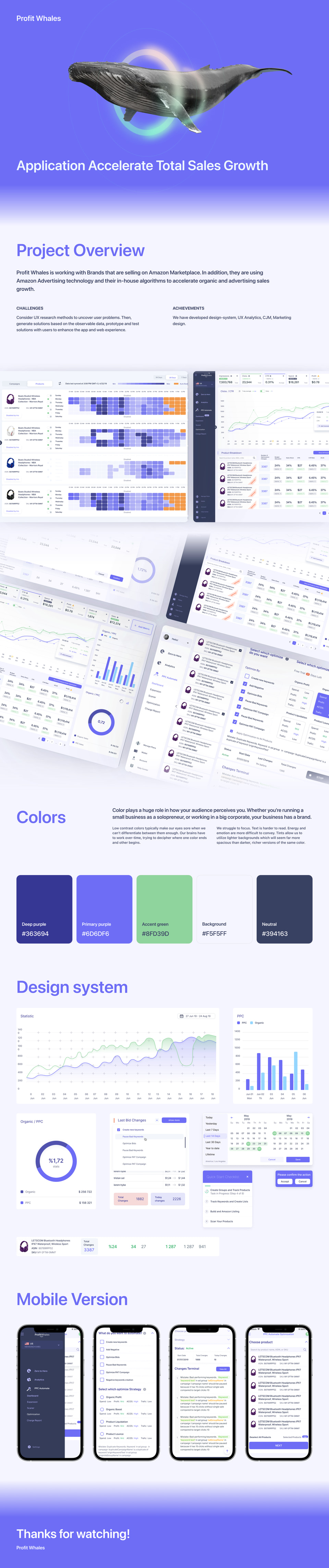
The visual case connects desktop dashboards with a component system and mobile screens. Its light surfaces, purple accents and repeated data patterns give dense information a consistent structure.
- Dashboards
- Cards, time-series charts and percentage indicators show different kinds of information without forcing them into a single chart. The selected period stays part of the view.
- Product tables
- Rows combine product identity with advertising and sales metrics. Repeated columns support scanning and comparison across products.
- Schedules and controls
- A weekly time grid presents campaign activity by day and hour. Separate controls cover campaign optimization options and related settings.
- Design system and mobile
- The case includes chart styles, controls, colors and reusable components. Mobile views adapt the same information patterns to a narrow screen.
The original design
Explore the screens, user flow, typography and color palette in the original visual case.

Designed by Alex Altunin
I’m a Product & UX/UI designer with 6+ years of experience. I work on web and mobile interfaces, with a focus on SaaS platforms, CRM and ERP workflows, dashboards and marketplaces.
Have a complex product to design?
Tell me about the product, the people who use it and the part you want to improve.
